Watching other Tesla owners receive the latest Full Self-Driving (FSD) update while your vehicle remains on an older version can be frustrating.
Whether you’re waiting for the latest FSD build, a new feature, or an over-the-air (OTA) software update, the good news is that there are several legitimate ways to improve your chances of receiving updates sooner.
While no one outside Tesla can force an update to your vehicle, these tips can help move your Tesla higher in the rollout queue and ensure your vehicle is ready as soon as your configuration becomes eligible.
Why Doesn’t Every Tesla Receive Updates at the Same Time?
Tesla doesn’t release software updates to every vehicle simultaneously.
Instead, updates are deployed gradually in waves to monitor stability across different vehicle models, hardware versions, regions, and software configurations.
If unexpected issues appear during rollout, Tesla can pause or adjust the release before it reaches more vehicles.
This staged approach helps improve overall software reliability but also means some owners receive updates days—or even weeks—before others.
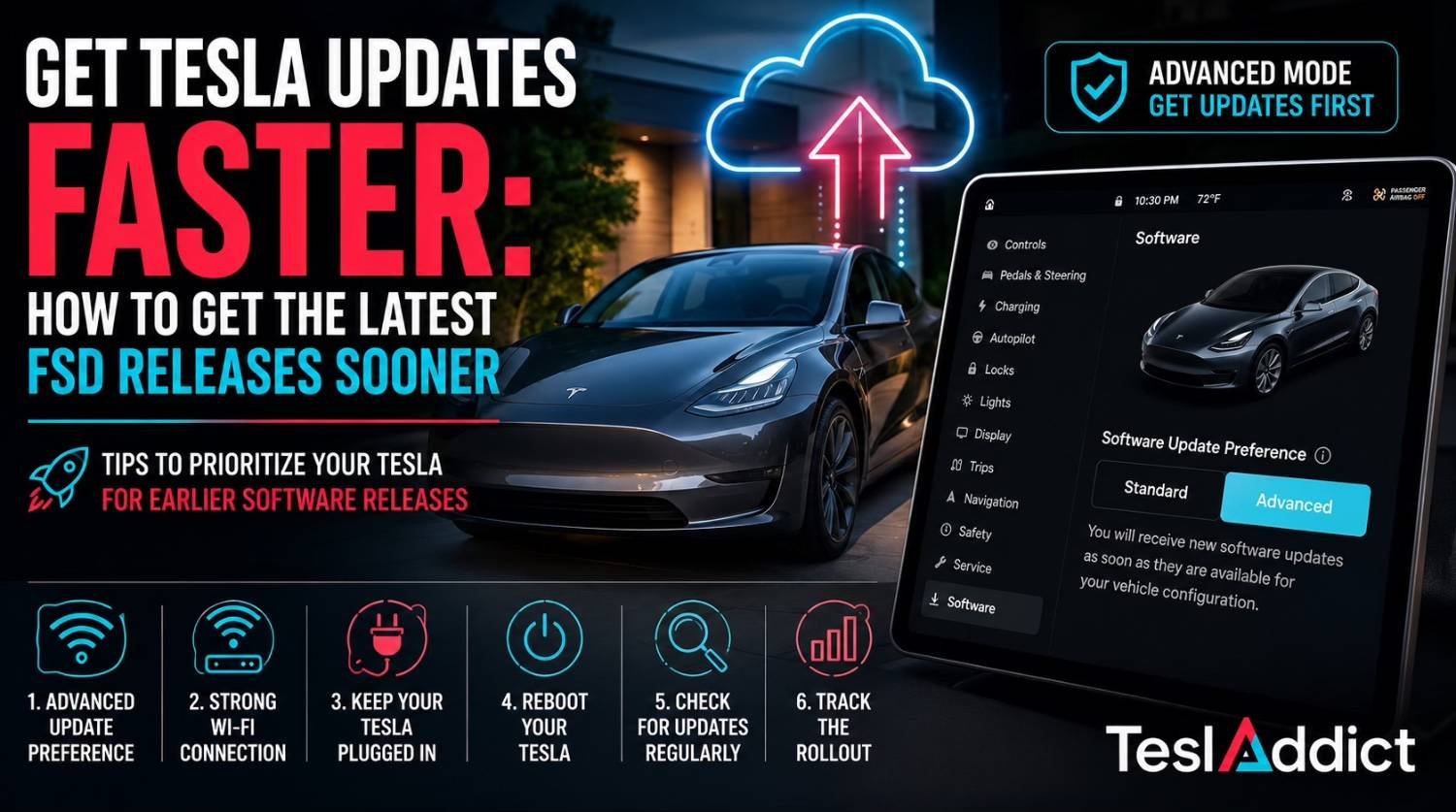
Step 1: Switch to Advanced Software Updates
If you enjoy receiving new features as early as possible, this should be your first stop.
- Open Controls
- Select Software
- Under Software Update Preference, choose Advanced
Advanced mode tells Tesla you’d like to receive eligible software updates as early as possible for your vehicle configuration.
Although it doesn’t guarantee immediate access, many owners consistently receive new releases earlier than vehicles using the Standard preference.
Keep in mind: Early builds may occasionally contain minor bugs that are fixed in later point releases.
Step 2: Give Your Tesla a Reliable Wi-Fi Connection
Most major software updates are downloaded over Wi-Fi.
To maximize your chances:
- Connect your Tesla to a reliable home Wi-Fi network.
- Park close enough to your router for a strong signal.
- Leave Wi-Fi enabled whenever possible.
- Avoid relying solely on cellular connectivity.
A stable Wi-Fi connection allows your vehicle to download updates immediately after they become available.
Step 3: Keep Your Tesla Plugged In
Although Tesla can install updates without charging, many owners report smoother downloads and installations when the vehicle is plugged in.
Whenever practical:
- Charge overnight.
- Maintain a healthy battery level.
- Allow the vehicle to remain idle during scheduled charging.
This ensures your Tesla is always ready when a new update arrives.
Step 4: Reboot Your Tesla
If it has been a while since your last update, performing a reboot may encourage your vehicle to check for available software.
You can reboot by:
- Holding both steering wheel scroll wheels until the touchscreen restarts.
- Waiting for the Tesla logo to appear.
- Allowing the vehicle to fully restart.
Some owners also perform a deeper reset by using Controls → Safety → Power Off, waiting approximately 10–20 minutes before waking the vehicle again.
While neither method guarantees an update, they can help refresh the vehicle’s software services.
Step 5: Check for Software Updates Regularly
Your Tesla automatically checks for updates, but it doesn’t hurt to verify manually.
Visit:
Controls → Software
If an update is available, your vehicle will begin downloading it automatically once connected to Wi-Fi.
You can also monitor download and installation progress directly from the Tesla mobile app.
Step 6: Track the Rollout
Not every Tesla receives identical software at the same time.
Community trackers such as TeslaFi, Teslascope, and Not a Tesla App often show which versions are actively rolling out and which vehicles are receiving them.
If your hardware and region haven’t started receiving a particular release yet, waiting may simply be part of Tesla’s staged deployment process.
What If Your Tesla Hasn’t Updated in Months?
If your vehicle hasn’t received any updates for an unusually long period, consider opening a service request through the Tesla app.
Select:
Service → Other
Explain that your vehicle appears to be behind on software updates and ask whether a software redeployment is appropriate.
In some cases, Tesla Service can refresh or redeploy the latest eligible software to your vehicle.
Common Mistakes That Delay Updates
Avoid these common issues:
- Leaving Software Update Preference set to Standard.
- Parking outside Wi-Fi coverage.
- Ignoring available downloads.
- Disconnecting Wi-Fi unnecessarily.
- Allowing the battery to remain very low for extended periods.
- Expecting every rollout to happen immediately.
Frequently Asked Questions
Can I force Tesla to send me an update?
No. Tesla controls when each vehicle becomes eligible for a software release. Owners can only optimize their vehicles to receive updates as soon as they become available.
Does Advanced mode guarantee earlier updates?
No, but many Tesla owners report consistently receiving eligible releases sooner than vehicles using the Standard preference.
Does rebooting my Tesla force a software update?
No. A reboot doesn’t force an update, but it may refresh background services and prompt the vehicle to check for available software.
Should I leave my Tesla connected to Wi-Fi all the time?
Yes. Keeping your Tesla connected to a reliable Wi-Fi network is one of the easiest ways to ensure updates download as soon as they’re released.
Can Tesla Service manually push an update?
In certain situations, Tesla Service may be able to redeploy the latest eligible software if your vehicle has become stuck or missed a rollout.
Related Reading
Bottom Line
Tesla software updates are one of the biggest advantages of owning a Tesla, continuously adding new features, safety improvements, bug fixes, and Full Self-Driving enhancements long after you take delivery.
While you can’t skip the rollout queue, keeping your vehicle on the Advanced update setting, maintaining a strong Wi-Fi connection, charging regularly, and occasionally rebooting your Tesla can improve your chances of receiving the latest releases sooner.
If you’re still waiting, don’t worry—Tesla’s staged rollout process is designed to ensure each update reaches owners safely and reliably.
What software version is your Tesla currently running? Let us know in the comments and tell us how long you usually wait for new FSD releases.